Buying Office Pods from China: Approval to Order
To turn an office pod quotation into a confirmed order, align four buyer decisions: the workspace, the purchase scope, the payment documents and the receiving plan. Then ask the supplier to confirm that same version in writing, including outstanding conditions and the agreed production starting point. Internal budget approval alone leaves those checks unfinished.
This guide starts when you have a supplier and a workable quotation. For the earlier company and manufacturing checks, use the China office pod buying guide. Here, the result is a purchase record that your users, procurement team, finance team, site coordinator and supplier can all act on.

1. What exactly is your team approving?
Give the proposed purchase a dated reference before circulating it. Attach the selected quotation, a model-and-quantity schedule, the configuration or drawing revision, and the delivery scope. Keep unselected alternatives outside the chosen total. If something remains undecided, show the supplier’s pricing assumption and the decision still needed.
Distinguish approval to investigate, approval of a budget allowance, approval of a technical configuration and authority to place an order. These can happen at different times. Record the scope beside each approval: “configuration C02 accepted” is more useful than “approved” without a reference.
For example, an office manager may approve a three-pod budget while the users are still deciding which two-person layout works. That permits continued evaluation under the buyer’s own rules; it does not tell the supplier which configuration to make. Equally, a designer’s approval of the layout does not establish that finance has accepted the invoice or payment schedule.
Use one selected scope when reviewing costs. The quotation comparison guide and its existing XLSX handle base supply, options, buyer-arranged work and unresolved costs. Keep that comparison as the cost record; the approval table below records who has accepted it and what must happen next.
2. Who needs to confirm each part?
Assign a person to each role even when one person handles several jobs. Ask each reviewer for a decision on the identified version, any conditions, and the next action. A forwarded email without a decision can leave procurement guessing whether a comment was a preference or a requirement.
On a narrow screen, scroll the table horizontally to view every column.
| Role | Decision to record | Useful evidence or input |
|---|---|---|
| Technical user or design lead | The selected workspace supports the activity, people and actual equipment; furniture and electrical choices are identified. | Configuration schedule, equipment dimensions, drawing revision and required performance evidence. |
| Procurement | The seller, selected offer, quantities, inclusions, exclusions and order route match the intended purchase. | Supplier record, quotation, buyer PO requirements and any proposed supplier terms. |
| Finance and budget approver | The cost scope, currency, invoice information, payment events and internal authority are acceptable. | Cost comparison, proposed invoice format where needed, payment schedule and approval reference. |
| Facilities or site lead | The receiving endpoint, access route, unloading, internal movement, assembly and site work have workable arrangements. | Site information, packing data requested for the order and a responsibility schedule. |
| Supplier order contact | The offered configuration, commercial scope, delivery basis, unresolved items and schedule conditions are understood and accepted. | A written response referencing the selected documents and identifying any differences. |
Put required submission documents in front of the right reviewer early. A project may require a technical datasheet, installation method, warranty draft or a specific test record before a purchase can be approved. Use the buyer’s actual list, with a response against every requested item. A file sent by the supplier still needs the reviewer’s decision; a missing file needs a named response, not an empty tick box. The compliance-document guide explains how to match evidence to the model and requirement.
3. How should the quote, PO, PI and confirmation correspond?
Link the documents through the same purchase reference and line items. Check the selected model, quantity, configuration revision, currency, scope, destination and payment events wherever those details appear. A short item label on a PO can refer to an attached configuration schedule; make that attachment and its revision explicit.
Document names and sequence vary. Some suppliers use a quotation and sales contract; others use a pro forma invoice and a written order acknowledgement. A buying platform may add its own order record. Agree which documents apply and how differences will be resolved rather than demanding every document in this table for every purchase.
On a narrow screen, scroll the table horizontally to view every column.
| Document or record | What it helps your team establish | What to match or obtain next |
|---|---|---|
| Budget quotation | An estimated cost for the stated assumptions. | Identify validity, exclusions and which selections still need a firm offer. |
| Selected quotation and configuration | The proposed goods, options, quantity and delivery scope. | Use the same drawing or configuration revision in the approval and order package. |
| Internal purchase approval | Who authorised which scope and spending commitment inside the buyer’s organisation. | Record conditions and whether the approver accepted the selected version. |
| Buyer purchase order, if used | The buyer’s order instructions and reference under its purchasing process. | Ask the supplier to identify acceptance, differences or information still required. |
| Pro forma invoice, if used | A quotation in invoice form, often used to organise the proposed transaction. | Compare its items, totals, currency, delivery point, payment terms and validity with the selected offer and PO. |
| Supplier confirmation or agreed contract | The supplier’s response to the proposed order and the terms being agreed. | Resolve differences and identify what remains conditional, including any production or scheduling conditions. |
| Platform order, if used | The transaction recorded through the agreed platform route. | Match it to the same goods and commercial scope; identify whether a replacement record supersedes an earlier one. |
The International Trade Administration describes a pro forma invoice as a quotation presented in invoice form. It can help organise a purchase; its title alone does not establish that payment was received or that manufacturing has started. Canada’s Trade Commissioner Service likewise includes checks between the buyer’s PO, the pro forma invoice and the sales contract or order confirmation in its export-documentation checklist.
If your company needs to review an invoice format before ordering, send the required fields and the purpose of the review. Ask what document will actually be issued and by whom. Finance should assess any tax-document requirements for the transaction and destination. A delivered-duty quotation or the words “tax included” do not answer that documentation question by themselves.
Keep bank details and other sensitive financial records in your company’s approved secure process. The working table needs a verification status and document reference, not a public copy of those details.
4. Which open items should stop the next commitment?
Pause the affected commitment when an unanswered question can change the product, affordability, ability to pay, required approval or ability to receive the goods. Examples include an unconfirmed equipment layout, a mandatory document the reviewer has not accepted, incompatible payment conditions, or an unresolved route into the building.
Some later-stage details can remain scheduled when the responsible people have agreed a feasible route and the missing detail does not undermine the present decision. For example, a site may have approved the handling plan but will nominate the person attending delivery closer to dispatch. Record the owner and deadline. If no capable unloading provider has been arranged, that is a different and potentially purchase-blocking gap.
Use clear statuses:
- Accepted for the named version: the decision and reviewer are recorded.
- Open — blocks the next step: identify the affected order line or commitment and the answer needed.
- Open — due at a later stage: record the agreed stage, owner and dependency.
- Change requires review: an earlier decision may no longer cover the proposed scope.
- Not applicable: record why the item does not apply.
A buyer’s inability to make an advance payment and a supplier’s requirement for payment before a specified event need an agreed commercial solution. Procurement should resolve that mismatch with finance and the supplier before depending on the order. Dividing a payment or changing its label does not resolve an unapproved commitment.
5. What should go in the approval and order confirmation table?
Use one copy for the selected purchase and repeat rows for configurations with different requirements. Name the document and revision, not just “latest quote.” In Current status, record Decision, Reviewer and Decision date on separate lines. A status without its evidence is still an open question.
For a MobileX configuration, several existing scope distinctions are useful inputs. MP1 and MP1+ include a desk and seat; MP2 and MP3 table-and-seating sets are separately quoted. A standard single-unit purchase can be discussed, while size and private-label requirements need their applicable order conditions checked. Colour references, destination voltage and socket choices belong in the configuration record. Use the current manufacturer data for initial inputs and the actual quotation for the selected scope.
Download the blank purchase approval and order confirmation CSV template. Fill it in your spreadsheet application and save your own copy; it does not send information to MobileX or save changes online.
Purchase reference: [ ] · Selected quotation/date: [ ] · Configuration revision: [ ] · Owner of this record: [ ]
On a narrow screen, scroll the table horizontally to view every column.
| Confirmation item | Document and version | Responsible person | Current status | Unresolved question | Next action / due stage |
|---|---|---|---|---|---|
| Model, quantity and activity | [Schedule / revision] | [Technical + procurement] | Decision: [ ] Reviewer: [ ] Decision date: [YYYY-MM-DD] |
[ ] | [ ] |
| Furniture, devices and electrical choices | [Configuration / drawing] | [Technical + supplier] | Decision: [ ] Reviewer: [ ] Decision date: [YYYY-MM-DD] |
[ ] | [ ] |
| Required project submission | [Requirement list + response revisions] | [Named reviewer] | Decision: [ ] Reviewer: [ ] Decision date: [YYYY-MM-DD] |
[ ] | [ ] |
| Seller identity and buyer onboarding | [Approved supplier record] | [Procurement] | Decision: [ ] Reviewer: [ ] Decision date: [YYYY-MM-DD] |
[ ] | [ ] |
| Selected cost and exclusions | [Quote + cost comparison] | [Budget approver] | Decision: [ ] Reviewer: [ ] Decision date: [YYYY-MM-DD] |
[ ] | [ ] |
| Invoice format and payment events | [Sample format if needed + terms] | [Finance] | Decision: [ ] Reviewer: [ ] Decision date: [YYYY-MM-DD] |
[ ] | [ ] |
| Destination and receiving/site work | [Delivery scope + site plan] | [Site lead] | Decision: [ ] Reviewer: [ ] Decision date: [YYYY-MM-DD] |
[ ] | [ ] |
| Buyer PO and any platform record | [References + current versions] | [Procurement] | Decision: [ ] Reviewer: [ ] Decision date: [YYYY-MM-DD] |
[ ] | [ ] |
| Supplier confirmation and differences | [Confirmation / contract reference] | [Supplier + procurement] | Decision: [ ] Reviewer: [ ] Decision date: [YYYY-MM-DD] |
[ ] | [ ] |
| Production and dispatch conditions | [Agreed milestone schedule] | [Supplier + buyer owner] | Decision: [ ] Reviewer: [ ] Decision date: [YYYY-MM-DD] |
[ ] | [ ] |
The table is a coordination record, not a substitute for the documents or the people authorised to approve them. Attach the accepted versions and keep superseded versions distinguishable. Treat production release as a separate recorded event when your agreed process requires it.
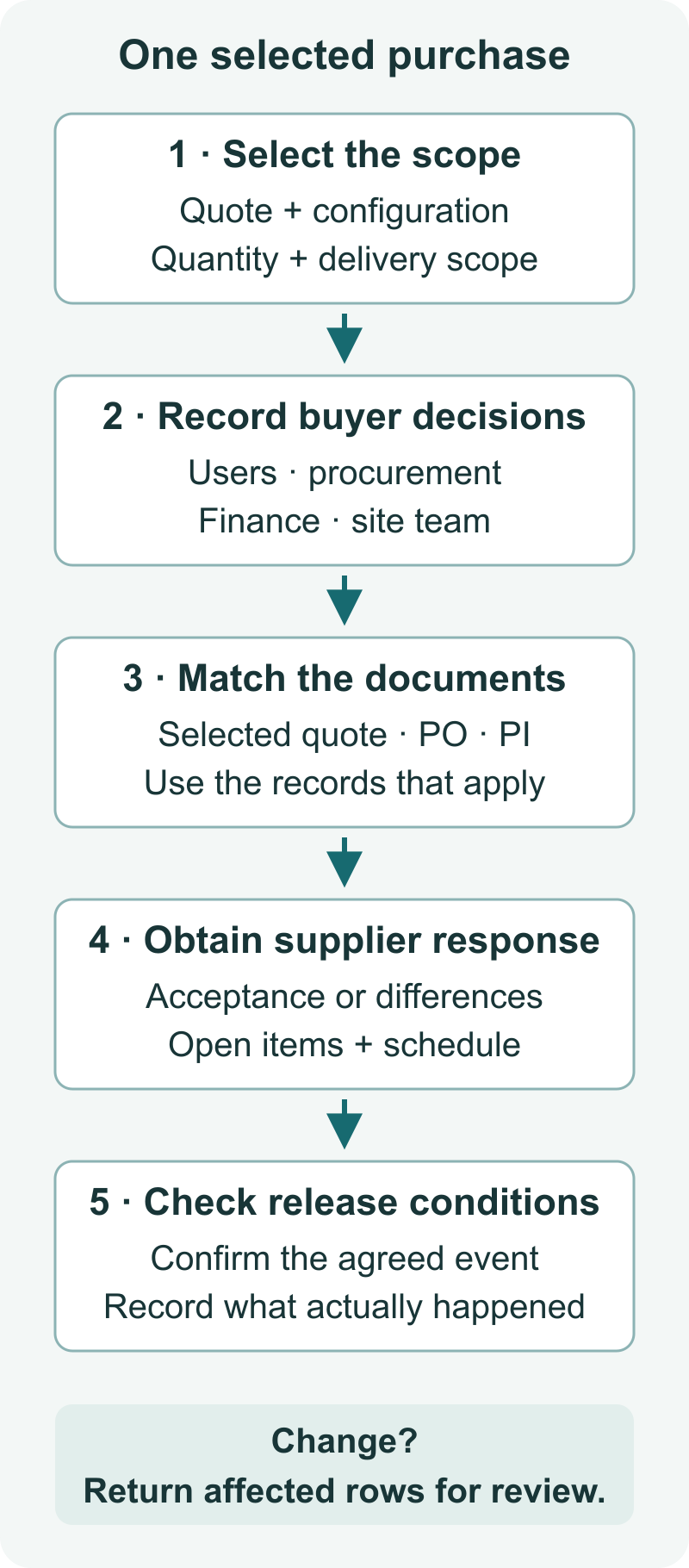
The diagram follows the same sequence as the table: identify the selected scope; collect the buyer’s decisions; match the order documents; obtain the supplier’s response; and check the agreed release conditions. A later change returns the affected decisions for review.
6. What changes when quantity, destination or configuration changes?
Ask for an impact review before carrying an earlier approval forward. Keep the unchanged decisions, but have their owners confirm that the new scope still falls within them. There is no universal rule that every change cancels all approvals, or that a change below the approved budget needs no further review.
On a narrow screen, scroll the table horizontally to view every column.
| Change | Documents or decisions to revisit | What may remain usable after review |
|---|---|---|
| Quantity | Unit schedule, price basis, total budget, packing/freight scope, PO, PI and supplier confirmation. | The same technical configuration, if the offered version and use remain unchanged. |
| Destination or delivery split | Shipment allocation, named receiving points, freight/site charges, access arrangements and delivery references across order documents. | Product requirements that the new locations do not change; verify electrical and site differences. |
| Model, furniture or equipment | Configuration/drawing, supporting evidence, price, packing and any affected approvals and order lines. | Unaffected lines that their reviewers explicitly retain. |
| Buyer entity or invoice details | Supplier onboarding, PO, proposed invoice information and finance’s verification process. | Technical decisions where the goods and use remain unchanged. |
| Required date | Supplier schedule, payment events, receiving arrangements and any conditional approvals. | Configuration decisions that the revised programme leaves unchanged. |
For engineering changes after drawing approval, use the existing drawing change-control guide. The additional job here is to update the purchase approvals and document references affected by that change.
Illustrative plan: the budget is approved, then delivery splits
Assume a company approves quotation Q02 for three identically configured pods delivered to Site A. Configuration C01 is accepted by the users. Before placing the order, facilities changes the allocation to two pods at Site A and one at Site B. These are invented references for a working example.
The quantity remains three. Procurement asks the supplier for Q03 covering the new allocation and receiving conditions. Finance reviews the revised total and invoice arrangements. Facilities checks Site B. The technical lead can retain C01 only after checking that the new location introduces no different equipment, electrical or use requirement.
On a narrow screen, scroll the table horizontally to view every column.
| Confirmation item | Document and version | Responsible person | Current status | Unresolved question | Next action / due stage |
|---|---|---|---|---|---|
| Product configuration | C01; Q03 response pending | Technical lead | Decision: Change requires review Reviewer: Technical lead Decision date: [YYYY-MM-DD] |
Does Site B change any requirement? | Confirm or revise C01 before order release. |
| Delivery and budget | Q02 retained as history; Q03 requested | Procurement + finance | Decision: Open — blocks commitment to split delivery Reviewer: Procurement + finance Decision date: [YYYY-MM-DD] |
What is the revised scope and total? | Review Q03 and record the budget decision. |
| Order documents | PO draft and PI to reference accepted Q03 | Procurement + supplier | Decision: Open — blocks final confirmation Reviewer: Procurement + supplier Decision date: [YYYY-MM-DD] |
Do both sites and the unit allocation match? | Align references and resolve supplier differences. |
Once Q03 and the required approvals are in place, update the applicable PO, PI and supplier confirmation. Keep Q02 as the earlier basis, clearly superseded for this purchase. A reviewer can then see both what changed and which decisions were retained, without reconstructing an email chain.
7. What should you send to obtain a clear supplier response?
Send one numbered package with the selected scope and the questions that need a decision. Separate requests for information from instructions to proceed. This gives the supplier a concrete version to accept, correct or hold.
Copy this cover note into your purchasing process:
Purchase reference and purpose: [project reference; request for confirmation or instruction under the agreed process]
Selected documents: [quotation, configuration/drawing and submission references with dates/revisions]
Order lines: [model, physical quantity, furniture/equipment scope and allocation by destination]
Buyer decisions: [technical, procurement, finance and site decisions; conditions still open]
Commercial documents: [PO/PI/platform references where used; invoice information and payment events to agree]
Delivery and site work: [named receiving point, included scope and buyer-arranged responsibilities]
Response requested: [confirm the selected version, identify differences, list information still needed and confirm schedule conditions]
Next milestone and owner: [who closes each open item and by when]
Review the response against the submitted package. An acknowledgement of receipt, a revised invoice, confirmation of payment and a production update each describe a different event. Record the event actually confirmed. Ask what starts any quoted lead time and which conditions remain outstanding; do not infer a booked production slot from an internal approval or a payment request alone.
For a MobileX purchase, send the selected scope and approval requirements so the proposed configuration, commercial documents and next steps can be discussed together. PO handling, payment channels, payment timing and production arrangements must be agreed for the actual transaction. This workflow does not promise credit terms, a particular platform route or a standard production-release rule.
Frequently asked questions
Does internal approval mean the order is confirmed?
Internal approval records the buyer’s decision within its organisation. Obtain and review the supplier’s response to the same scope, including differences and conditions. Keep those records together instead of assuming that one approval communicates every decision to both sides.
Should we issue a PO or ask for a pro forma invoice first?
Ask procurement and the supplier which sequence they use. A PI can support review before a PO, while another purchase may use an agreed quotation first. The practical requirement is that the documents used describe the same selected transaction.
Can we keep an approval after changing the destination?
Keep it only for the scope its owner confirms still applies. A destination change can affect transport cost, site access, electrical requirements or invoicing. Revisit those decisions and update the relevant documents; unchanged product decisions need not be discarded without a reason.
Can some documents arrive after the order is placed?
Some records, such as final dispatch evidence, are produced at a later stage. Agree their timing and reviewer. A document required for the buyer’s pre-order approval needs a different treatment: resolve it or obtain an explicit approved alternative before relying on that approval.
What if our payment policy conflicts with the supplier’s terms?
Identify the exact event each party requires and ask whether an acceptable arrangement is available. Until it is agreed, keep the affected commitment on hold. A sufficient budget does not by itself resolve incompatible payment timing.