Office Pods for Law Firm Client Meetings: When a Pod Fits and When a Private Room Is Better
A meeting booth can add a useful client-conversation space when a solicitor and client need a short, contained meeting, a remote specialist joins on screen, or existing rooms are regularly unavailable. It is not automatically the right room for every consultation. A fixed private room is usually the better choice when the meeting needs more participants, extensive papers, formal signing arrangements, established accessibility, secure file storage or privacy controls that have already been assessed for the matter.
Choose the space by the work inside, not by the words “private pod.” Count every person who may enter, lay out the documents and devices that must be used, trace what passers-by can see, and define what happens to files and screens before the next client arrives. The enclosure is one part of the firm’s arrangements. It is not a guarantee of legal professional privilege, confidential speech, data security or protection against eavesdropping.
This guide is deliberately limited to solicitors in England and Wales
The Solicitors Regulation Authority guidance on client confidentiality explains that SRA-regulated solicitors and firms must keep current and former client affairs confidential unless disclosure is required or permitted by law or the client consents. It also says firms need appropriate arrangements to protect information and distinguishes confidentiality from legal professional privilege. Those duties belong to the firm and its people; buying an office pod does not satisfy them by itself.
This jurisdictional boundary matters. The operational questions below can help other professional-service buyers think about rooms, participants and documents, but they are not a single compliance standard for accountants, consultants or lawyers in other jurisdictions. Each organisation must apply its own professional, legal, client and site requirements.
Match the consultation task to the room
Scroll horizontally to compare all columns on a narrow screen.
| Client-meeting task | Useful starting point | What must fit and remain controlled | When a fixed private room is better |
|---|---|---|---|
| Solicitor alone with a remote client | Checked single-person pod, such as an MP1 or MP1+ route | Laptop or display, camera direction, notes outside the remote view, power and a clean close between matters. | Use an existing room when the solicitor needs several screens, large bundles, a colleague in the room or established privacy controls beyond the checked pod setup. |
| Solicitor and client reviewing or signing papers | Two-person meeting layout, such as an MP2 route | Two real working positions, a clear document surface, screen sightline if used, door operation and space to handle papers without placing them against glazing or circulation. | Use a private room when documents must be spread out, a witness or additional adviser is needed, the session is long, or secure storage and controlled printing are part of the workflow. |
| Companion, interpreter or remote expert joins | Larger checked layout, such as an MP3 route, or a fixed meeting room | Every physical participant, the screen or interpreting position, the client’s line of sight, papers and a route that does not force someone to stand in the doorway. | Use a private room when the participant count can change, the client needs tailored communication support, or the proposed pod cannot establish suitable access and working positions. |
| Complex advice, sensitive evidence or multi-party signing | Existing private consultation or meeting room | Stable privacy controls, sufficient table area, document custody, equipment, participant changes and any site-specific access arrangement. | A pod should only re-enter the comparison if a project-specific layout and the firm’s own controls can support the defined task without weakening the existing process. |
Treat papers, signatures and screens as layout inputs
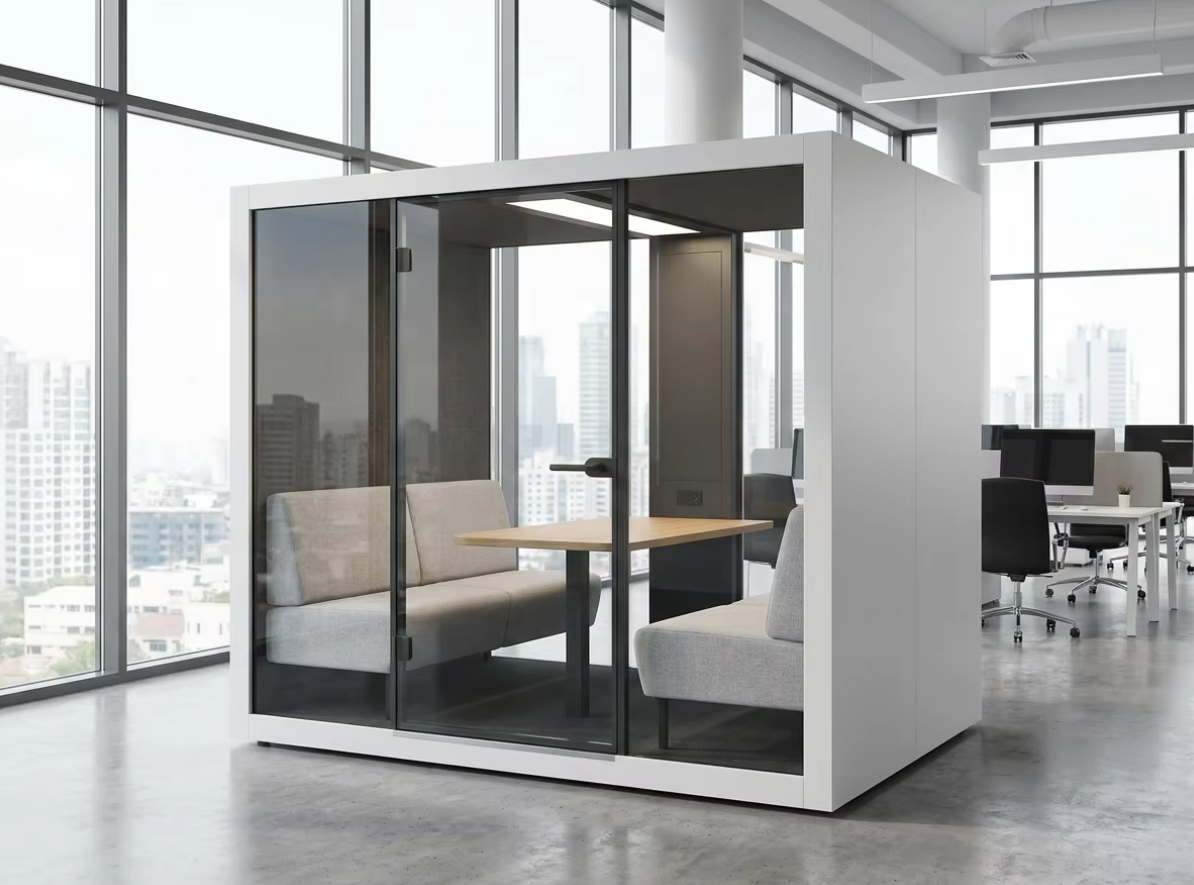
A two-seat image does not prove that two people can review a contract, place identification documents, use a laptop and sign pages without conflict. Build a simple mock-up of the actual work surface before choosing capacity. Put down a representative document set, the intended device and any non-sensitive demonstration material. Check whether both people can read, point, write and pass papers while the door remains usable.
If a signing process requires another participant, count that person from the start. Do not assume a companion can wait inside the doorway or that a remote witness, adviser or expert removes all physical-space needs. The firm remains responsible for deciding what signing method and identity process are valid for the matter. The pod comparison only asks whether the proposed room supports the approved process.
Screen sharing creates another set of sightlines. The client should be able to see the relevant material without exposing another client’s information on a second display or leaving internal messages visible. A privacy filter, device policy or secure application may be part of the firm’s controls; none is created by the enclosure itself.
Plan for companions and interpreters before fixing capacity
A client meeting that begins as a two-person conversation can become a three- or four-person task when a companion, interpreter, independent advocate or specialist joins. The Law Society guidance on vulnerable clients identifies communication adjustments that may include extra meeting time and support from interpreters, readers or other third parties. These are choices for the solicitor and client under the relevant circumstances, not product features.
The physical arrangement should let the client communicate with the solicitor without the third party accidentally becoming the centre of the conversation. If interpretation is used, decide the participant positions and whether a screen is also required. If someone joins remotely, check where their image appears and whether the camera captures confidential papers or people outside the meeting.
Do not choose a nominal four-person pod merely because four people might attend. Compare the actual positions, work surface, display and entry route. When communication needs, participant roles or session length require a more flexible setup, an existing private room is the stronger choice.
Keep waiting clients away from active matters
The pod location affects more than the person inside. A waiting client should not have to stand beside glazing, overhear the previous meeting, see a name on an exposed screen or pass through another matter team’s workspace. Reception or the responsible staff member should know where the next client waits and when the room is ready.
- Arrival: use a room name and route a visitor can follow without entering restricted staff areas.
- Waiting: separate the waiting position from the pod door and from sightlines into an active meeting.
- Assistance: identify who helps with the screen, door or room controls without requiring the client to disclose the substance of the matter in an open area.
- Departure: prevent the next client from entering until papers, screens and personal items from the prior meeting are cleared.
Partially obscured glazing may change sightlines, but it does not prove acoustic privacy or compliance. Fully clear glazing may help staff see whether a room is occupied, yet it can expose faces, screens and papers. Treat glass visibility as an operating choice to be reviewed with the firm’s own privacy and safety requirements.
Separate sound, sight, data and document custody
Sound privacy concerns what speech can be understood outside under the relevant test and site conditions. Visual privacy concerns faces, screens, papers and attendance. Data security concerns devices, meeting links, recordings and systems. Document custody concerns who controls originals, copies, printouts and signed material. Improving one does not complete the other three.
The SRA guidance applies confidentiality to information about a client’s affairs and notes that prospective-client information can also require protection. It also advises firms to limit information gathered before a conflict check where appropriate. The procurement implication is practical: do not use a pod waiting area, room booking display or reset checklist to expose client names or matter details that are not needed for room operation.
Use the office pod acoustic evidence guide to distinguish material, component, complete-enclosure and field evidence. An ordinary office pod should not be described as completely soundproof, anti-eavesdropping, recording-secure or guaranteed confidential. The firm must decide whether the proposed room and its location are appropriate for the actual matter.
Reset the room without turning it into file storage
A consultation pod works best as a bookable room, not an unattended extension of a matter file. The handover should remove client material, close the remote session and return the room to a known state. If the firm needs controlled physical storage, printing or scanning, those functions should remain in its approved systems and spaces unless a project-specific solution has been assessed.
- Close: end calls and screen sharing, sign out of shared equipment and confirm that no recording remains active.
- Clear: remove originals, copies, notes, labels and removable media; check seats and the floor for overlooked papers.
- Reset: return agreed movable items to their intended positions and report faults without recording confidential meeting content.
- Release: tell reception or the next user that the room is available only after the previous matter is fully cleared.
A visible room schedule can show availability without displaying the client, solicitor or matter name. The firm should choose the minimum operational information needed for booking and support.
Use model dimensions as a starting point, not a finished consultation layout
For MobileX standard starting points, the internal dimensions are MP1 880 x 920 x 2080 mm, MP1+ 1120 x 1080 x 2080 mm, MP2 1880 x 920 x 2080 mm and MP3 1880 x 1520 x 2080 mm. These figures are not net doorway dimensions, furniture working clearances, transport clearances or accessibility clearances. They do not prove that a pictured table, seat, screen, socket or storage element is included.
A solicitor working alone on a remote client call can start with the MP1 and MP1+ office phone booth buying route. A solicitor and client, or a small approved participant group, can start with the MP2 and MP3 meeting booth buying route. Select from the checked task and layout, not from capacity words alone.
All four model families support custom sizes subject to project review. Custom support does not mean every requested size, glazing treatment, security function, furniture arrangement or performance condition is automatically feasible. Use the custom modular pod route only when the documented client-meeting workflow cannot be served by an appropriate standard starting point.
Illustrative scenario: add one consultation space without replacing the private room
Illustrative scenario
A hypothetical England and Wales law firm has one fixed private meeting room. Short two-person document reviews often compete with internal meetings, while complex consultations, accessibility-led arrangements and multi-party signings already work well in the fixed room.
The buyer keeps the private room for those complex tasks and compares an MP2-type meeting layout for scheduled solicitor-client reviews. The test setup uses the real document bundle and laptop, checks the door and glazing sightlines, and defines a reset that removes every client paper. If an interpreter, companion or remote expert is expected, the booking moves to the fixed room unless a larger checked layout clearly supports all participants. This is a planning example, not a MobileX law-firm installation, customer case, confidentiality assessment or compliance result.
Know when the existing private room should win
Keep using the existing room when it already provides the work surface, participant flexibility, established accessibility, privacy controls and document handling the meeting requires. It should also win when the matter involves extensive evidence, frequent entry by support staff, an uncertain participant count, a long session or a client communication adjustment that the pod layout has not been shown to support.
A pod can be valuable where a repeated, narrower task lacks a suitable room: one solicitor on a remote client call, a short two-person review, or a small hybrid consultation with a checked screen setup. The purchase should close that defined room gap. It should not displace a better existing process merely because the enclosure looks private.
For general type selection, use the office pod, phone booth and meeting booth guide. For two-person versus four-person meeting use, use the meeting booth capacity guide. The interview-pod guide covers recruitment workflows; this article adds client-matter documents, participant authority, professional confidentiality, waiting and file handover.
Send a client-meeting brief that can be quoted
Keep client names and matter details out of the product enquiry. Describe the operational pattern and the physical items instead.
- Meeting types: remote client call, two-person advice, document review, signing, hybrid specialist session or another defined task.
- People inside: solicitor, client, companion, interpreter, witness, adviser or remote participant, without identifying a real client.
- Work inside: approximate paper set, laptop, display, note-taking, signing and any approved device workflow.
- Site relationship: proposed location, waiting point, reception route, nearby staff areas and the fixed rooms that remain available.
- Handover: booking release, screen logout, document removal, room reset and fault reporting.
- Supply boundary: standard or custom route, offered furniture and interfaces, local work and evidence required for the selected configuration.
Send MobileX the meeting tasks, participant counts, work materials, proposed position, quantity and destination. MobileX can discuss a product and quotation route; the firm remains responsible for its professional obligations, matter-specific privacy assessment, data systems, access arrangements and client-service process.