Library Meeting Booths: Plan Tutoring, Group Discussion and Quiet-Zone Boundaries
Add a small enclosed space to a library when a recurring spoken task has no reliable place between an open study seat and a fixed discussion room. One-to-one tutoring, a short peer discussion or a remote academic call may justify a meeting booth when users need to speak, share material and hand the space to the next group without disturbing a quiet reading zone. A pod is not automatically the best answer: silent individual work belongs at an appropriate open or screened seat, while a large group, accessible route, presentation or long session may be better served by an existing room.
The purchasing decision starts with the work, not the label. Count the people physically inside, the books and devices they must use, whether anyone joins remotely, and how users arrive, receive help and leave. A nominal seat count does not prove that the proposed table, screen, doorway, circulation or acoustic evidence suits that task.
Use the existing library zones before adding another room type
Libraries already separate activities in different ways. Georgetown Law Library’s published noise zones reserve quiet zones for individual study without talking, allow group conversation and virtual meetings in collaborative zones, and permit moderate conversation in community zones. The University of San Diego Copley Library policies likewise distinguish quiet and collaborative areas, group rooms, individual rooms and a room for online meetings. These are operating choices made by the named institutions, not universal standards and not evidence that either institution uses MobileX products.
A buyer should first map where each recurring activity already works. If an open table supports quiet reading well, keep it. If a bookable room is available at the required times and already supports the group, screen and access route, use it. Consider an additional enclosure where spoken work repeatedly conflicts with the current room mix or where the available room is too large, too remote or too difficult to reserve for a short task.
Match the task to the space
Scroll horizontally to compare all columns on a narrow screen.
| Library task | Best starting point | What the layout must support | When another space is better |
|---|---|---|---|
| Independent silent reading | Open carrel, screened study seat or an existing quiet room | Books, laptop, notes and visual focus without occupying a shared conversation space. | Do not use a meeting booth merely to provide another silent desk when the current quiet area already works. |
| One-to-one tutoring | Two genuine working positions in a small meeting enclosure or a reservable study room | Shared view of a book or screen, two sets of notes, a clear entrance and a nearby place for staff assistance. | Use an existing room when the learner needs more space, specialized equipment, an accommodation or a caregiver/support person. |
| Peer or small-group discussion | Meeting Booth or fixed discussion room sized for the actual participants and materials | Everyone speaking and hearing, a shared work surface, books or devices, and an exit route that does not cut through quiet readers. | Use the fixed room for larger, longer or changing groups, presentations, movable teaching layouts or circulation not supported by the pod. |
| Remote academic exchange | Checked single-person or small meeting space according to who is physically present | Camera direction, screen visibility, power and network path, spoken participation, notes and a way to request help. | Use an existing online-meeting room when it already has the required equipment, support and access. |
This table separates the activity from the product route. It does not claim that every open seat, study room or pod has the same acoustic, furniture, technology or accessibility characteristics. Those characteristics must be evaluated for the actual space and offered configuration.
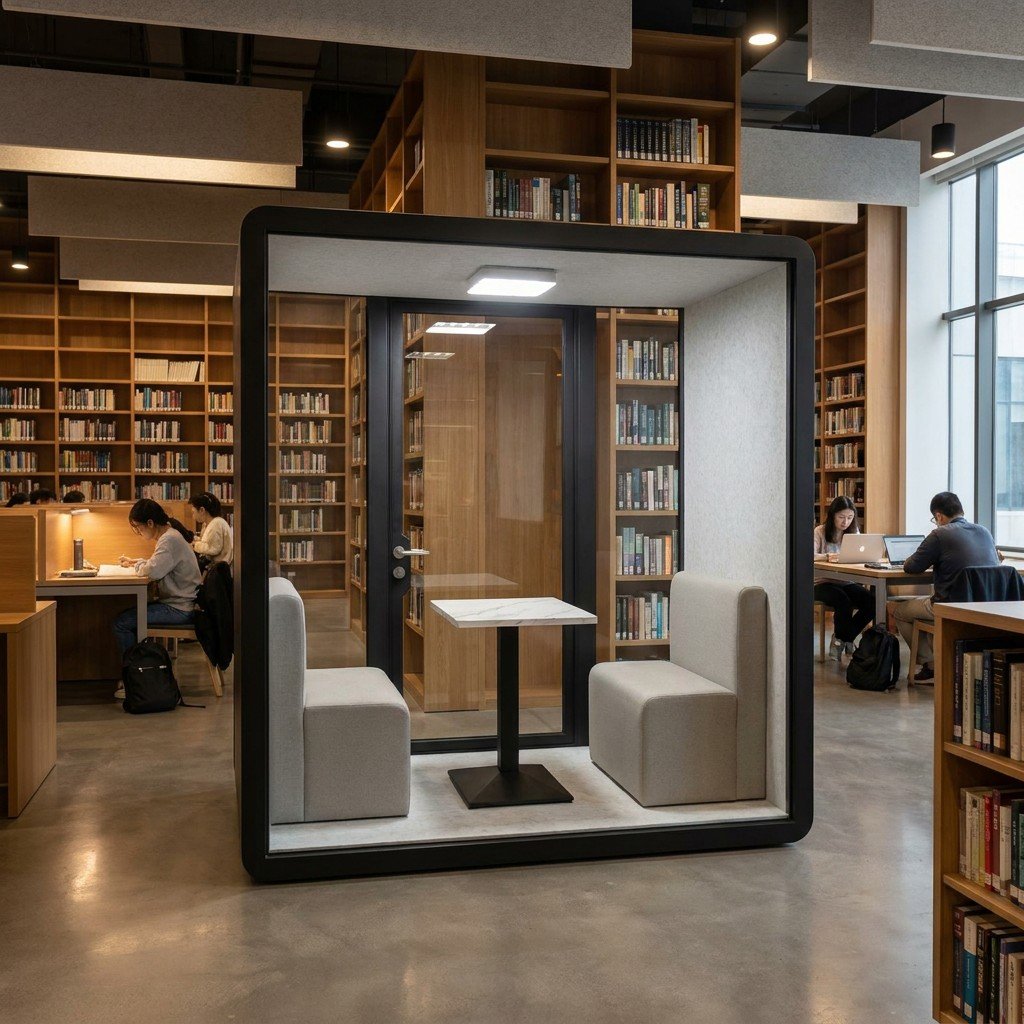
Plan tutoring as shared work, not just two seats
Tutoring often places a tutor and learner beside or opposite each other while both look at the same worksheet, book or laptop. The buyer should check the usable work surface and sight line for that material, rather than treating two nominal seats as proof of a workable lesson. A tutoring session that needs manipulatives, several open books, a second display or a support person may exceed a compact two-person arrangement.
Scarsdale Public Library’s tutoring policy directs tutoring to designated spaces or study rooms and says sessions must not interfere with normal library operations. Its rules also address room use and handover of younger children to a caregiver. That policy illustrates how tutoring involves location and supervision as well as furniture. It is specific to that library and should not be copied as a universal age, supervision or booking rule.
For a MobileX purchasing route, compare the proposed two-person layout with the MP2 and MP3 meeting booth options. If the task is one person joining a remote tutor, start with the MP1 and MP1+ single-person options. The product page is the place to request the actual drawing and quoted configuration; the photograph above does not establish that the pictured furniture or interfaces are included.
Keep group discussion from becoming a quiet-zone conflict
An enclosure can reduce the direct spill of a conversation into nearby space, but placement still matters. Do not place a discussion space where waiting users, opening doors and repeated arrivals create a new disturbance beside the quietest seats. Check the relationship to the service desk, main entrance, stairs, printers, existing group rooms and the path users take while carrying books or laptops.
- Beside a collaborative zone: the pod can extend a place where moderate spoken activity is already expected, while giving a small group a clearer boundary.
- At the edge of a quiet zone: verify the door orientation, waiting point and circulation route so users do not queue or talk beside silent-study seats.
- Near the service desk: assistance is easier, but staff conversation, returns activity and queues may affect the experience. Check the real operating pattern.
- In a remote corner: the enclosure may be less disruptive, but users may struggle to find it or obtain help. Wayfinding and oversight become more important.
A general office pod should not be described as completely soundproof or guaranteed private. Use the office pod acoustic evidence guide to distinguish materials, components, complete-enclosure testing and field conditions. Visual privacy, speech privacy and the handling of user data are separate questions.
Choose capacity from people, material and screen direction
A short peer conversation with two laptops has a different envelope from a tutor reviewing a large workbook or three students sharing a screen. Record who is physically present, what lies on the work surface and where each person must look. If remote participation is involved, include the camera and display direction. If a member of staff regularly enters to help, include that movement instead of assuming the rated seats describe the complete task.
The MobileX internal dimensions are MP1 880 x 920 x 2080 mm, MP1+ 1120 x 1080 x 2080 mm, MP2 1880 x 920 x 2080 mm and MP3 1880 x 1520 x 2080 mm. These values are not net doorway dimensions, furniture working clearances, transport clearances or accessibility clearances, and they do not prove that a pictured table, seat, screen or interface is included.
Use a standard model as a starting point only after the task is defined. All four model families support custom sizes subject to project review. Custom support does not mean every requested dimension, layout, interface or performance condition is automatically feasible. When a standard layout cannot support the checked group and materials, use the custom modular pod route or keep the activity in an existing room.
Make remote academic exchange usable
A remote thesis discussion, language exchange, advising call or group project adds equipment and support to the spoken task. Decide whether one person or several people will be inside, whether they share one screen, and whether they need to show physical material to the remote participant. Test the actual camera position, microphone path, screen glare, connection and power arrangement for the offered configuration.
The Copley Library policy identifies a dedicated Zoom Room as well as individual and group rooms. This supports the practical idea that online participation can require a distinct room and equipment workflow. It does not prove that all libraries need a dedicated video room or that a MobileX pod includes a particular display, camera, software account or network service.
A pod can provide a physical boundary, but the institution still owns account access, recordings, meeting links and support. Avoid leaving a prior user’s account active on a shared device. Do not record student names or meeting content merely to measure room use. If a user needs assistance, staff should be able to help without walking into another group’s active discussion.
Design the booking and handover around the task
A short tutoring session can overrun. A group can leave books, cables or an open meeting on the screen. The next user may wait in the quiet zone and start a conversation there. The handover plan should therefore cover the space outside the enclosure as well as the reset inside it.
Escondido Public Library’s room information describes study spaces used for reading, tutoring, small-group discussion and virtual meetings. Its published rules cover availability, staffing and equipment limits, prompt departure, cleaning/reset and personal belongings, and expressly avoid guaranteeing privacy or soundproofing. Those are the named library’s rules, not MobileX service terms, but they show why a buyer should define the operating handover before choosing a room.
- Before use: show the room name, permitted task, capacity and how to obtain help. Keep the waiting point away from quiet readers and the doorway.
- At the end: close calls, sign out of shared accounts, remove papers and belongings, and return agreed movable items to their intended positions.
- Between users: inspect visible condition, report faults and apply the library’s actual cleaning process without inventing a universal turnover interval.
- When time expires: direct the group to an appropriate continuation space instead of allowing the discussion to move into a quiet aisle.
For detailed booking and turnover choices, use the pod booking, access and handover guide. For the number and mix of independent spaces, use the office pod quantity-planning guide. This article remains responsible for the library task and quiet-zone decision rather than repeating those workflows.
Illustrative scenario: add one spoken-work option without replacing the reading room
Illustrative scenario
A hypothetical university library already has open silent carrels and two large reservable discussion rooms. Staff observe three recurring tasks: one student joining a remote adviser, a tutor and student reviewing a laptop and workbook, and three students discussing a project for 30 minutes. The large rooms are useful for presentations but are often occupied, while spoken work at the carrels disrupts nearby readers.
The buyer keeps individual silent work at the carrels and retains the large rooms for bigger groups and presentations. A checked single-person pod can be compared for the remote call. A two-person meeting layout can be compared for tutoring, provided the actual work surface, screen position and entry route suit the task. The three-person discussion is compared against an MP3-type layout and the existing room, not forced into a nominal two-seat product. The proposed pods are placed beside a collaborative area with a waiting point away from quiet seats. This is a planning example, not a MobileX installation, customer case, performance result or required library policy.
Know when the existing room should win
Keep using a fixed discussion room when the group is large or variable, the session uses a large display or physical teaching materials, a support person joins, users need a verified accessible route, or the institution has already established appropriate equipment and privacy controls there. Use an open or screened seat for genuinely silent individual work. Use a teaching room for instruction that needs movement, whiteboards, multiple observers or frequent staff entry.
Do not present a standard office pod as suitable for every student or as meeting accessibility requirements without evaluating the actual doorway, route, controls and site. Do not describe it as a standardized testing room, guaranteed confidential space or a way to improve grades or learning performance. The enclosure is one room option within an operating plan, not a substitute for the library’s policies, services or staff judgment.
For the narrower choice between a quiet individual enclosure and an open seat, read Study Pods vs Open Carrels. For two-person versus four-person meeting arrangements, use the meeting booth capacity guide. These pages answer different decisions and should not be treated as interchangeable.
Send a library task brief that can be quoted
A useful enquiry names the recurring work and the current room gap. It does not need student names, tutoring records or meeting content.
- Tasks and duration: silent work, tutoring, peer discussion, remote exchange or another defined activity, with typical and peak session lengths.
- People and material: participants physically inside, books, laptops, shared screen, notes and any support person or staff assistance.
- Existing spaces: open carrels, quiet rooms, discussion rooms and online-meeting rooms that will remain in use.
- Proposed position: quiet and collaborative zones, service desk, entrance, waiting point, circulation and nearby readers.
- Handover: booking, room identification, help, account sign-out, belongings, cleaning and fault reporting.
- Product route: standard or custom starting point, actual drawing, quoted furniture and interfaces, quantity and delivery destination.
Send MobileX the tasks, participant counts, materials, proposed position, quantity and destination. The resulting quotation should identify the offered model, layout and supply scope. That creates a purchasing path without turning an industry application guide into a claim about a completed campus project, universal library policy, accessibility, acoustic privacy or learning outcomes.