Telemedicine Pod Procurement: Define the Consultation Workflow Before the Equipment List
A useful telemedicine pod brief describes a complete visit before it specifies a screen or an enclosure. Explain how a person arrives, enters, connects to the service, receives assistance and leaves the space ready for the next user. Then separate the pod and site work from the network, communication equipment, software and clinical service. Each part needs an identified supplier or operator and an agreed handover point.
For clinics, pharmacies and facilities teams, this approach makes quotations comparable without treating a furnished booth as a complete healthcare service. A room can be delivered while its network, staffing or platform arrangements remain unresolved. Those dependencies belong in the project brief, not in assumptions made after installation.
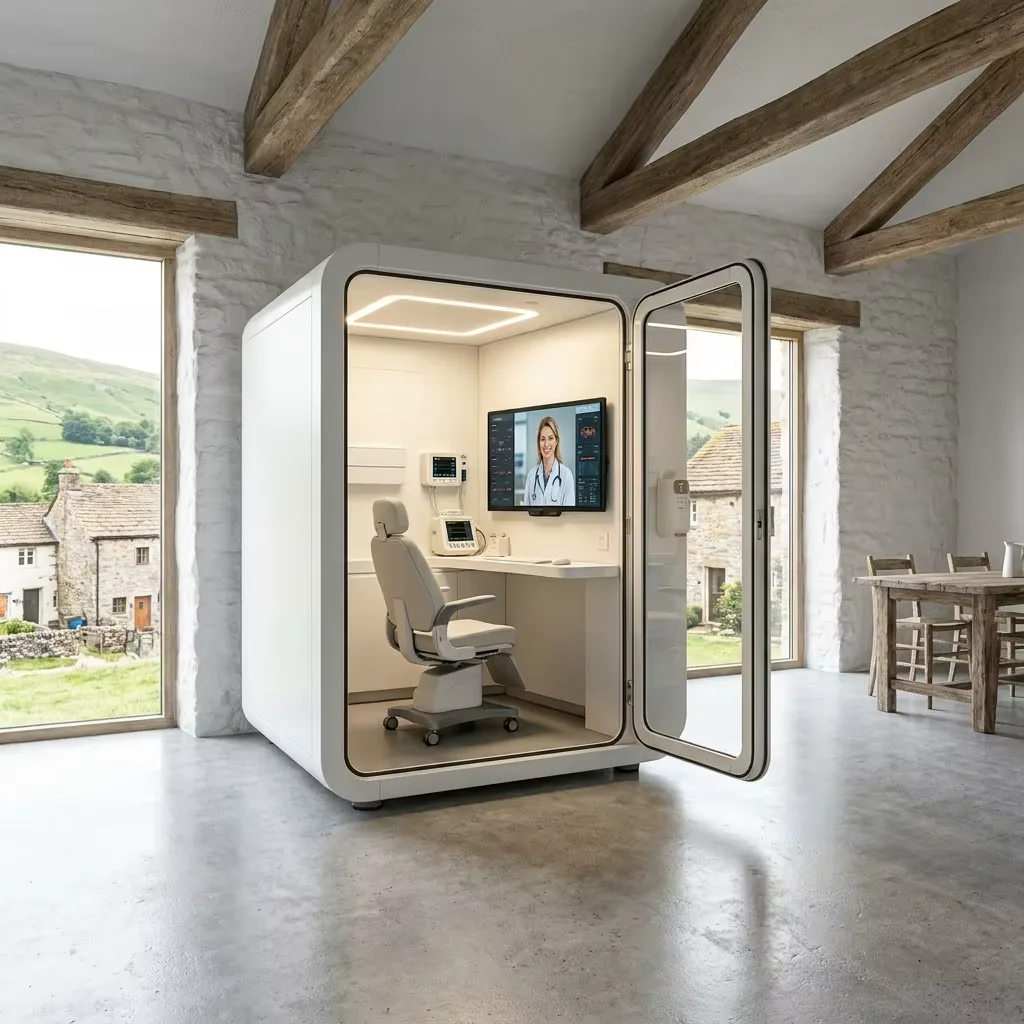
Describe One Visit From Arrival to Departure
Start with a typical service journey and the people involved. An independently operated video appointment has different space and support requirements from a visit where a local staff member assists the user. Include a companion or interpreter where the intended service requires one; a nominal single-person enclosure is not automatically suitable for every visit.
Ask the healthcare operator to define the appointment types it intends to offer and which situations should use another service or room. Procurement can translate that decision into space and equipment requirements, but it cannot determine clinical suitability.
The U.S. HHS guide to planning a telehealth workflow treats scheduling, staffing, technology assistance and the visit itself as connected processes. The table below is a buyer's planning worksheet, not a clinical protocol or an existing MobileX operating system.
Scroll horizontally to compare all columns.
| Visit stage | Space or equipment question | Operational owner to name |
|---|---|---|
| Booking and arrival | Where does someone wait, and how do they find the correct room without exposing appointment details? | Healthcare operator and reception team |
| Entry and preparation | Who needs to enter together? Where are belongings placed, and how is assistance requested? | Facilities team with the service operator |
| Connection | Which approved application and devices are used, and who helps if the session cannot start? | Platform provider or integrator and local IT |
| Consultation | Can the intended participants use the seat, desk, camera and screen without obstructing access? | Operator, AV integrator and pod supplier for their respective scope |
| Departure and reset | Who ends the session, checks the room, cleans appropriate surfaces and reports a fault? | Named local operating team |
For example, in a hypothetical pharmacy project, the first design may place check-in, a waiting chair and the pod entrance beside a busy counter. Before selecting a screen, examine whether staff can offer assistance without blocking the entrance or requiring the user to discuss personal information in the queue. A different waiting location or assistance procedure may solve the problem more effectively than adding equipment inside the pod.
Separate Five Parts of the Project
Use the same scope headings in the pod quotation, the integrator's proposal and the site plan. A heading can be shared, but each deliverable should have one accountable owner. Where one party depends on another, record what must be provided and when.
Scroll horizontally to compare all columns.
| Project part | Information to obtain | Boundary to make explicit |
|---|---|---|
| Pod enclosure and interior | Agreed dimensions, door arrangement, desk or work surface, lighting, ventilation provisions, cable routes and finishes | Which items are included, optional or reserved for buyer equipment? |
| Receiving site | Location, access route, installation conditions, building services and local approvals | Who prepares the site and completes local connections or other works? |
| Network and AV equipment | Actual device models, network design, screen and camera positions, mounting and service access | Who supplies, configures and tests each device and the connection? |
| Software and information systems | Selected platform, accounts, licensing, access method and any required integration | Who approves the system and owns its configuration, data handling and support? |
| Clinical service and daily operation | Staffing, appointment process, assistance, room reset and escalation arrangements | Which healthcare provider and local operator run the service after equipment handover? |
MobileX POD's telemedicine pod product page and manufacturer information are the starting points for discussing the enclosure and project configuration. Keep the final included items in the written quotation for the selected order. A screen shown in a reference image does not establish that a display, camera, medical device or software subscription is included.
The distinction also applies to support. An enclosure supplier may be the right contact for a door or agreed mounting provision; it is not automatically the support desk for a third-party application or the provider responsible for clinical decisions.
Turn the Workflow Into a Space and Site Brief
Provide a marked floor plan, the destination country, the intended number of occupants and the actual furniture and device dimensions. Distinguish the external pod footprint from the internal usable layout. Check how the door opens, how users sit or stand, and whether staff can reach the equipment that they must operate or maintain.
Describe the surrounding room as well as the pod. Include adjacent seating, walkways, windows, the waiting area and nearby sources of noise. Identify how people will obtain help when the door is closed. The local facilities and service teams should review access and emergency arrangements against the applicable site requirements; a drawing or product photograph alone cannot establish suitability.
State the building's operating conditions and available services. Ask how the proposed enclosure's ventilation relates to the surrounding space, whether cooling is needed and who designs and completes any site work. Use the cooling, ventilation and site-work guide for that separate decision rather than assuming a fan provides air conditioning.
Cleaning requirements should come from the operating organisation and the relevant equipment or surface instructions. Obtain the proposed material information so the team can check the intended cleaning method. Keep any specialist clinical cleaning, waste handling or infection-control requirements with appropriately qualified personnel; they are not established by calling the enclosure a telemedicine pod.
Specify Connections With the Integrator, Not From a Stock Photo
An equipment list becomes useful when each item has a model or dimension sheet and an assigned location. For a buyer-supplied screen, for example, include the mounting interface, supported mounting arrangement, cable connections, power requirements and the access needed for replacement. Ask the pod supplier to confirm the proposed mounting and openings against that information.
The integrator should establish whether the project uses a computer, an appliance, a browser session or another approved setup. Confirm the camera and microphone connections, device selection, account management and how a local assistant can help. If additional clinical devices are proposed, their selection, appropriate use and system compatibility need confirmation from the healthcare operator and the relevant device and platform providers.
Have local IT review the real connection at the intended location, including the site's security and access policies. A data-port position on a drawing is not a verified network service. Ask the platform or device provider for its applicable requirements rather than inserting a generic internet-speed figure into the pod specification.
For cut-outs, brackets and cable routes, provide those inputs before approving drawings. The custom pod drawing guide explains how to connect equipment information to the factory and locally completed supply scope.
Assess Room Privacy and Information Handling Separately
Review what can be seen from the entrance, waiting area and neighbouring positions. Consider screens during check-in, the live session and after the user leaves. Separately assess the possibility of speech being overheard with the intended door state and surrounding activity. These are different questions from the security of the remote communication platform.
Where confidential conversation is a material requirement, define the intended use and obtain an appropriate site-specific review. The speech privacy procurement guide explains what product evidence and assessment information to request. An enclosed room, a photograph or an unspecified acoustic claim is not a confidentiality guarantee.
For U.S. projects, HHS states that telehealth delivered by covered healthcare providers and health plans must comply with the HIPAA Rules, and identifies obligations concerning technology vendors and business associate agreements. See its telehealth technology guidance. These are responsibilities for the relevant service and technology organisations, not a certification conferred on a pod by its appearance. Other jurisdictions and organisations require their own applicable review.
Keep procurement files free of real patient records. Use equipment specifications, generic visit descriptions and fictitious test accounts or data when demonstrating the proposed setup. The operator should decide what information is visible, retained or cleared in the actual service and who is permitted to access it.
Plan Booking, Assistance and Between-Visit Handover
Decide whether the room is staff-controlled, booked in advance or made available through another managed process. Name who handles late arrival, an occupied room and a missed appointment. Discuss any proposed access hardware with the pod supplier and integrator, including its power, mounting, data and locally required safety arrangements. Electronic access or booking integration should be an agreed project item, not an assumed feature.
Define the normal reset between visits: the authorised session is ended, personal belongings are removed, the workstation is left in the agreed state and the responsible team performs the required cleaning and readiness checks. Explain where an equipment problem is reported without putting patient details in a general facilities ticket.
A useful support plan distinguishes three calls: a room or furniture issue goes to the facilities route; a connection or application issue goes to the designated technical support route; a clinical concern goes to the healthcare service. The operator should establish its escalation and alternative-service arrangements before opening the room. Procurement should ask for those contacts and responsibilities, not invent a clinical fallback procedure.
Compare Quotations Against the Same Deliverables
Retain quantity, destination, layout, equipment list, electrical requirements, packaging and delivery terms in the enquiry. Add the interfaces and responsibilities identified above. Ask each supplier to mark included work, options, buyer-provided items and unresolved dependencies, rather than answering with an undifferentiated package price.
A base pod reference is not the same as an installed, connected and operational consultation service. The current quotation should state the agreed configuration, supply scope, price, timing and commercial terms. Keep payment, warranty, support coverage and any local installation responsibilities in the actual quotation or contract for that project. Use the quote comparison guide to compare those boundaries.
Before accepting the room into use, arrange a non-clinical walkthrough with the local operating team and the parties responsible for the equipment and platform. Check entry, seating, assistance, connection, session exit and reset using the intended setup. Record outstanding work against its owner. This establishes what has been demonstrated; it does not substitute for clinical approval, specialist inspections or privacy compliance review.
Copy This Workflow Brief Into Your Enquiry
- Project and intended service: [organisation type, destination and general visit purpose; no patient information]
- Participants and assistance: [who enters, who assists and where they wait]
- Room and site: [marked plan, access route, surroundings and building services]
- Pod configuration: [space, door, desk, seating, lighting, ventilation and finish requirements]
- Equipment: [model list, dimensions, mounting data, power and connection information]
- Technology ownership: [network lead, AV integrator, platform provider and account administrator]
- Operations: [booking, entry, assistance, reset and fault-reporting owner]
- Review responsibilities: [clinical service, local facilities, privacy and any specialist assessments]
- Quote scope: [quantity, destination, delivery boundary, required project date and open questions]
Send the brief and a marked layout to MobileX POD to discuss the enclosure and agreed project provisions. Product catalogues and the healthcare space overview provide related starting points. The healthcare service, platform and local site work remain separately defined responsibilities.
MobileX POD is the export brand of Shenzhen MobileX Technology Co., Ltd., registered in Shenzhen, China. Its factory, office and showroom are at No. 22 Yuhe Road, Dongshan Village, Qishi Town, Dongguan, Guangdong, China.