Office Pod Ventilation: Airflow, Fan Count, Noise and Air Renewal
Are MobileX office pods ventilated?
Yes. Current MobileX office pods use an active, bidirectional ventilation configuration. For project buyers, however, the important questions are how airflow is measured, how many fans the proposed model uses, and which operating conditions apply.
That distinction matters because a compact occupied workspace is not described adequately by the word “ventilated.” The proposed pod, the fan setting, the inlet and outlet conditions, the door state, occupancy and the surrounding installation can all change the completed-project result. This guide explains how to read the available MobileX configuration and measurement records without turning component data into a universal project promise.
Why “has a fan” is not enough for a buying decision
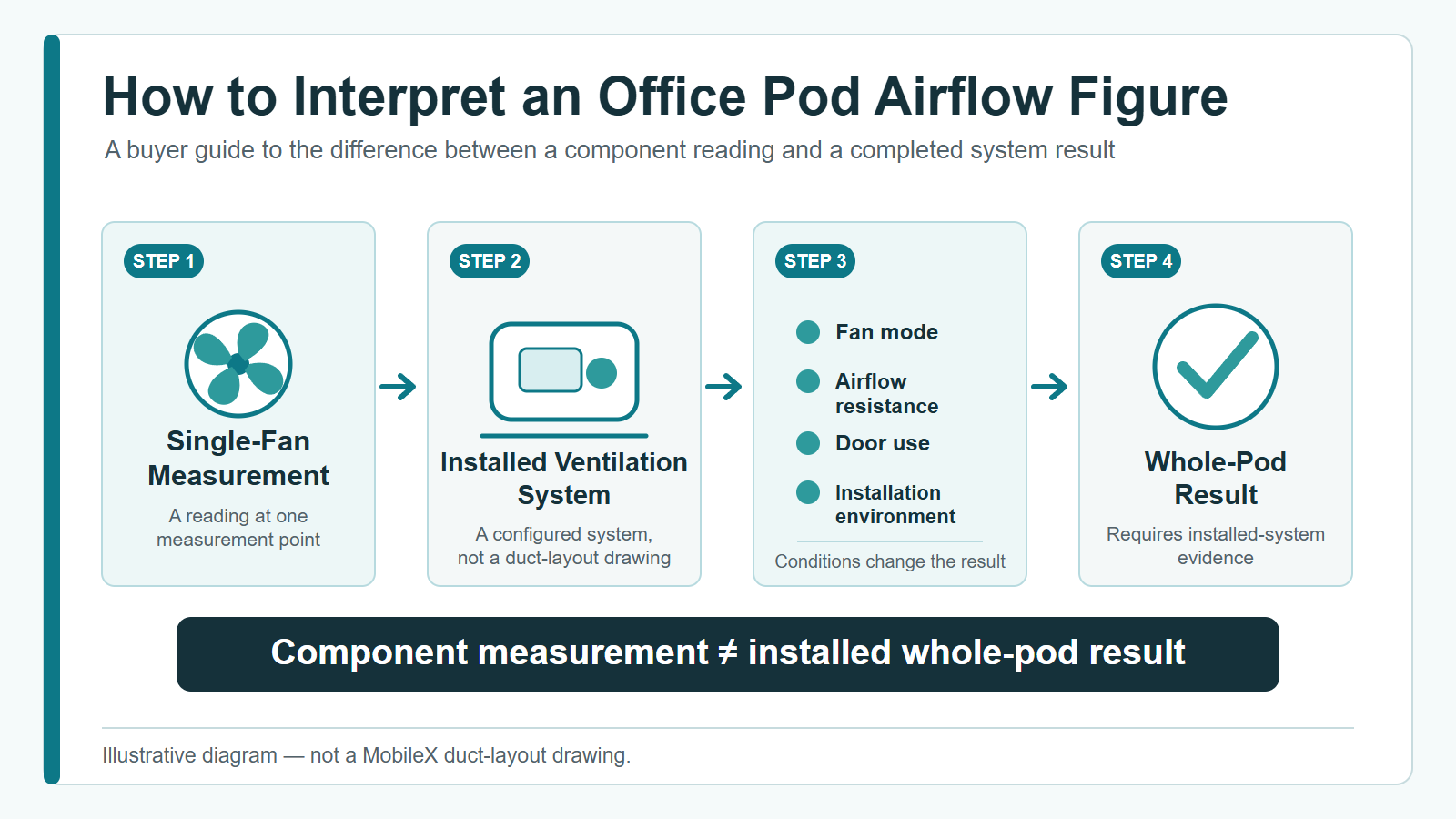
A ventilation claim can describe several different things: a single component reading, a parts-list total, an observation during product testing, or an installed whole-pod result. Those scopes are not interchangeable. A useful comparison asks where the figure was taken, which operating mode applied and whether the result was measured after the system was installed in a completed pod.
This is especially useful when comparing compact individual booths with larger meeting booths. A fan count gives configuration context; it does not, by itself, prove the air movement, comfort or noise that will be experienced in a particular room. Buyers should keep the evidence scope attached to every number they compare.
MobileX first-party ventilation measurement summary
The following summary combines current MobileX product-configuration records with first-party ventilation measurements. The airflow range is a single-fan measurement, not an installed whole-pod airflow measurement. The noise and renewal observations have partially recorded test context and must be confirmed for the specific project.
| Record | Current MobileX record and decision boundary |
|---|---|
| Ventilation system | Active, bidirectional ventilation configuration. This does not describe heat recovery, a filter grade, pressure control or a detailed duct layout. |
| Single-fan airflow measurement | 89–120 CFM (approximately 151–204 m³/h). One current fan measurement only; it is not an installed whole-pod airflow, effective air-change or performance guarantee. |
| Current model fan configuration | MP1: 1; MP1+: 2; MP2: 2; MP3: 4. Fan count does not establish model-specific installed airflow or renewal time. |
| Fan operating record | 750 / 1200 RPM. The selected setting must be confirmed for the project. |
| Noise observation | Below 35 dB(A); approximately 28 dB(A) at low speed. First-party measurement with partially recorded test context; not a third-party certification or all-site guarantee. |
| Air-renewal observation | Approximately 3–5 minutes. Current product-test observation, not assigned to a specific model; actual results can vary with pod, setting, occupancy, door state and installation environment. |
How to interpret an airflow figure
The first-party range above describes one fan. It should not be multiplied and presented as a whole-pod result without an installed-system measurement. Airflow resistance, the installed inlet and outlet arrangement, operating mode and the surrounding space can alter the result after a fan is built into a pod.
For a quotation or technical review, ask the supplier to identify the measurement point and whether the value is a component reading or an installed-pod measurement. Then ask which model, operating mode and installation conditions apply. This keeps a component capability from being mistaken for a project-specific performance commitment.
The same discipline applies when several figures are shown together. A proposal can be clear without claiming more than it measured: it can identify the component, state the selected model, describe the operating condition and explain what still needs confirmation. That record is more useful in procurement than an attractive number that cannot be connected to a real project condition.
Compare Ventilation Offers in the Same Units and Operating Mode
A larger printed number is not necessarily more airflow. CFM, litres per second and cubic metres per hour express volume over different periods. Convert the units first, then compare the measurement scope and operating mode. A fan reading and a completed-pod reading remain different evidence even when their units match.
Use CFM x 1.699 = m³/h, or L/s x 3.6 = m³/h. To change CFM to L/s, multiply by approximately 0.472. These rounded factors follow the NIST volume-flow conversion table. Keep the original value and unit beside the converted value so a reviewer can trace the calculation.
A worked comparison: three numbers, one rate
Hypothetical offer example: one sheet lists 100 CFM, another lists 170 m³/h, and a third lists 47.2 L/s. The first converts to about 170 m³/h; the third also converts to about 170 m³/h. Those rounded figures describe essentially the same volume flow. This example is arithmetic, not a MobileX model rating or a quotation from any named supplier.
| Hypothetical offer record | After unit conversion | What the buyer can decide |
|---|---|---|
| A: 100 CFM measured at one fan | About 170 m³/h at that component | Keep as component evidence. It does not establish completed-pod airflow. |
| B: 170 m³/h through the installed pod at maximum mode | Same nominal volume rate, different test scope and mode | Use for the documented maximum-mode comparison; obtain the occupied-use mode if it differs. |
| C: 47.2 L/s through the installed pod at the proposed occupied-use setting | About 170 m³/h at that stated setting | Compare with another installed-pod result under equivalent conditions, including the noise record for that setting. |
Record a second line when an offer has both a normal occupied setting and a maximum setting. Do not pair its maximum airflow with its lowest-speed sound figure and present them as one operating condition. Equally, a stated maximum is useful evidence when the proposed use actually employs that mode; it should not be discarded simply because it is a maximum.

Apply the method to the MobileX record
The factory’s 89-120 CFM single-fan record converts to approximately 42-57 L/s, or the 151-204 m³/h already shown above. These are alternative units for the same first-party measurement, not three separate tests. Keep that row at single-fan scope. The recorded model fan counts identify the configuration; multiplying by the fan count does not produce an installed-pod measurement.
For a two-person or four-person comparison, keep both the model and intended occupancy in the offer sheet. If a supplier gives airflow per person, the stated number of occupants is part of that figure. Dividing an identified total rate by occupancy can describe an allocation, but cannot turn component airflow into delivered outdoor air or establish a universal occupancy limit. A renewal time also needs its volume, method and operating conditions; a shorter stated time alone is not a ranking of ventilation quality.
Turn the figures into a shortlist
Separate offers into directly comparable installed results and records that still need a scope or operating-mode answer. Select between comparable offers using the mode required for the work, its matching sound information and the proposed inlet/outlet arrangement. Keep a clear factory measurement in the comparison at its actual scope rather than replacing it with an assumed whole-pod total.
When the unresolved issue is hot incoming air or building operating hours rather than the airflow unit, continue with the cooling and host-room planning guide. Send MobileX the model, occupancy, planned fan setting and the competing figures with their original units. That gives the project discussion a specific comparison to resolve instead of an undefined request for more fans.
Why current fan configuration differs by model
The model configuration in the summary shows that the proposed pod must be identified before a ventilation claim can be evaluated. A compact individual booth and a meeting booth are not interchangeable use cases. The right question is not simply which model has more fans; it is whether the proposed configuration, operating conditions and project evidence match the way the pod will be used.
Use the linked model pages in the summary to confirm the selected product format. For cross-model selection and project fit, start with the Office Pod product hub. The article owns ventilation interpretation; the product pages own individual model selection and configuration context.
Fan speed, noise and the conditions behind a claim
The current record above lists two operating speeds. That information is useful only when it remains connected to the proposed model and mode. A buyer should ask whether the project will use the same setting during calls, focus work or meetings, and whether the system is accessible for normal maintenance.
The first-party noise observation above is useful context, not a blanket promise. A completed-project result can be affected by the installed configuration, airflow resistance, ambient background noise, door use and operating mode. A supplier should be able to state the test context rather than relying on an isolated low-noise label.
Air renewal: what buyers should ask for
The observed product-test range in the summary is not a model-by-model commitment. Before confirmation, request the evidence scope for the proposed configuration: whether the observation was measured or calculated, what the operating mode was, how the door was treated and which environmental conditions were recorded.
This is a more decision-useful question than asking whether the system has “air refresh.” It makes the buyer compare like with like and leaves room for actual installation conditions. This article does not claim a fixed whole-pod airflow, air-change rate, carbon-dioxide result, temperature result or health outcome.
Red flags when comparing office pod ventilation claims
- The claim does not state whether the figure is for a component or an installed pod.
- A fan count is given without identifying the proposed model or operating setting.
- An air-renewal claim has no test conditions, door state or measurement scope.
- A noise figure lacks distance, background-noise or operating-mode context.
- A theoretical sum of component readings is presented as a whole-pod measurement.
- The proposal gives no inlet, outlet or maintenance-access information.
- The same blanket claim is used across different pod models without a model-specific configuration check.
None of these red flags proves that a proposed pod is unsuitable. They show where a buyer needs a clearer technical answer before comparing offers.
A practical ventilation checklist before project confirmation
- Identify the exact model and intended occupancy pattern.
- Ask whether the system is active and how the proposed configuration moves air through the pod.
- Confirm the number of fans fitted to the proposed model and the available operating modes.
- Ask whether an airflow figure is a single-component, calculated or installed-pod measurement.
- Request the test context behind any renewal or noise statement.
- Confirm the location of the inlet and outlet, plus reasonable maintenance access.
- Confirm the electrical configuration required for the destination project.
- Keep ventilation evidence with the selected configuration rather than treating a generic figure as a universal commitment.
For the broader pre-order technical review, use the Office Pod Specification Checklist. That checklist covers wider project preparation; this article remains limited to ventilation evidence and how to interpret it.
If the project has a particularly sensitive acoustic, occupancy or installation requirement, put the ventilation questions into the quotation review rather than leaving them for delivery. This does not require a buyer to define a system design; it asks the supplier to document the evidence and assumptions behind the proposed configuration.
Frequently asked questions
Does the proposed model need to be named before ventilation can be compared?
Yes. A fan count and operating record are meaningful only when connected to the actual pod being quoted. Ask the supplier to identify the model and the configuration proposed for the project.
Is a component airflow reading the same as whole-pod airflow?
No. A component reading describes the stated measurement point. An installed pod can have different results because of system resistance, layout and operating conditions.
Does a larger pod automatically have better ventilation?
Not from fan count alone. Compare the proposed configuration, evidence scope and operating conditions rather than assuming that more components establish a completed-project result.
What should a buyer ask about fan noise?
Ask how the sound was measured, which operating mode applied, what background conditions were recorded and whether the evidence relates to the proposed configuration.
Can an air-renewal statement be treated as a universal promise?
No. It should be read with its test conditions and checked against the selected pod, operating mode, occupancy, door state and installation environment.
What maintenance question matters most?
Ask where service access is provided and what routine inspection or replacement work is expected for the installed configuration. Do not assume a maintenance method from a generic airflow claim.
Project confirmation note
For a completed project, confirm the selected model, operating mode, electrical requirements, installation environment and the evidence available for that configuration. The MobileX Contact page is the single next step for a project-specific ventilation and configuration discussion.
Prepared from current MobileX product configuration records and first-party ventilation measurements. Performance in a completed project can vary with the selected pod, operating mode, installation environment and use conditions.